NEWer Image Manager 1.3
Posted: Wed Sep 23, 2026 12:02 am
A few new features added but this version is mostly addressing the session and path issues in ver.1
Any comments would be much appreciated – for good or for ill.
https://plugins.bludit.com/plugin/image ... r#download
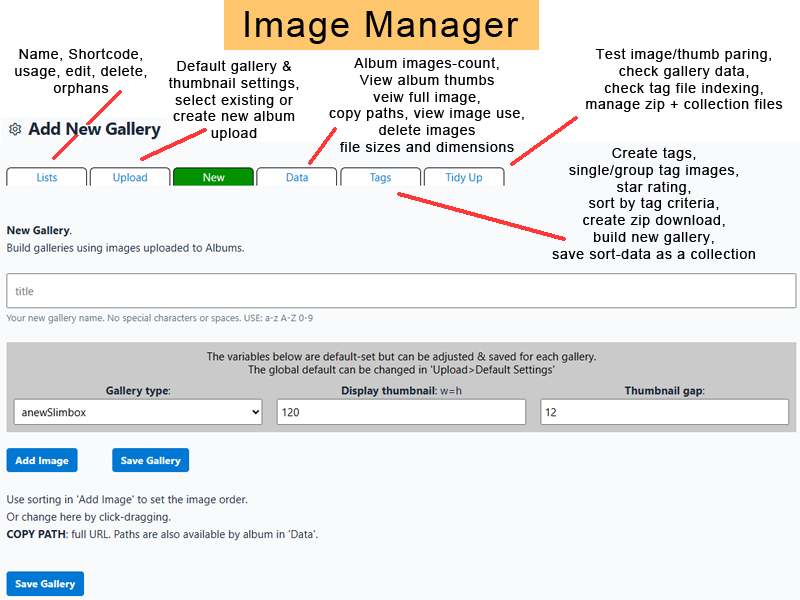
There are six areas of function.
LISTS
Details of galleries: names, shortcode, page usage, edit/delete
A list of galleries that may have been deleted – orphans.
UPLOAD
Set global defaults: lightbox type, thumbnail crop size, thumbnail display size, thumb gap
Select an existing album or create new.
Upload is standard, multi-file selection.
Thumbnails are auto-created on image upload.
NEW (gallery)
Set title, gallery type, thumbnail display size (independent of default), thumb gap (ditto)
Adding an image is by album. View thumbs. Set sort order. Select individually or all.
Each image can be titled with a caption description.
Image & thumbnail paths can be copied.
Image entry can be deleted.
DATA
Each album total image-count.
View album contents by thumb. Click to view full size image.
Copy image and thumb paths.
View image use by page, gallery & cover image. Also fileName & type.
Image use data is copied to clipboard on viewing.
Delete an image.
View image file-size & image and thumb dimensions.
TAGS (3 sub functions)
1: Add and delete tag names.
2: Tag individual images in an album or group tag.
Set star ratings.
Remove all tags and stars from the open-album *.tag file.
3: Set criteria for sorting image data; by tag, orientation, date & star-ratings.
Search all image data. The result can be variously managed...
View thumbnail images and names.
Zip all files (choice of primary and/or thumbs) for download.
Build a gallery of the result images.
Create a collection file; album/fileName for later use.
If no criteria is set it returns all image data which can be zipped and downloaded; a full backup.
TIDY UP (6 sub functions)
1: Check all album folders for image/thumbnail file-pairs.
2: Check that image files listed in each gallery *.json file exist; ditto thumbnails.
3: Test tag file key value alignment. Edit tag files.
4: List zip files for download or deletion.
5: Collections; edit, download images, build a gallery, delete collection.
6: Migration. A few thoughts.
Any comments would be much appreciated – for good or for ill.
https://plugins.bludit.com/plugin/image ... r#download
There are six areas of function.
LISTS
Details of galleries: names, shortcode, page usage, edit/delete
A list of galleries that may have been deleted – orphans.
UPLOAD
Set global defaults: lightbox type, thumbnail crop size, thumbnail display size, thumb gap
Select an existing album or create new.
Upload is standard, multi-file selection.
Thumbnails are auto-created on image upload.
NEW (gallery)
Set title, gallery type, thumbnail display size (independent of default), thumb gap (ditto)
Adding an image is by album. View thumbs. Set sort order. Select individually or all.
Each image can be titled with a caption description.
Image & thumbnail paths can be copied.
Image entry can be deleted.
DATA
Each album total image-count.
View album contents by thumb. Click to view full size image.
Copy image and thumb paths.
View image use by page, gallery & cover image. Also fileName & type.
Image use data is copied to clipboard on viewing.
Delete an image.
View image file-size & image and thumb dimensions.
TAGS (3 sub functions)
1: Add and delete tag names.
2: Tag individual images in an album or group tag.
Set star ratings.
Remove all tags and stars from the open-album *.tag file.
3: Set criteria for sorting image data; by tag, orientation, date & star-ratings.
Search all image data. The result can be variously managed...
View thumbnail images and names.
Zip all files (choice of primary and/or thumbs) for download.
Build a gallery of the result images.
Create a collection file; album/fileName for later use.
If no criteria is set it returns all image data which can be zipped and downloaded; a full backup.
TIDY UP (6 sub functions)
1: Check all album folders for image/thumbnail file-pairs.
2: Check that image files listed in each gallery *.json file exist; ditto thumbnails.
3: Test tag file key value alignment. Edit tag files.
4: List zip files for download or deletion.
5: Collections; edit, download images, build a gallery, delete collection.
6: Migration. A few thoughts.