
Hello,
I'm just taking the first steps in getting acquainted with this script, and accordingly, testing it on the domain. But, drew attention to the following things:
1. After upload the plugin "open-links-new-tab-pilab-master", it does not appear in the "plugins" section in the site control panel.
2. After upload the plugin "Brocken Links Checker", the site is not displayed at all - just a white page.
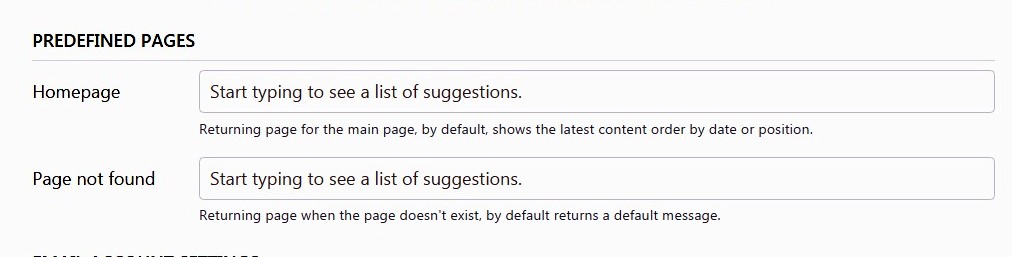
3. When compose a new post, and after clicking on button "Preview", the page appears with the inscription "Page not found, Hey! It looks like this page doesn't exist."
Please check it.
And, separately, the question where and what needs to be written in the code, so, that these tags automatically appear in the downloaded pictures (photos) - ALT and TITLE?
Bludit Version - 3.10.0 Standart
Regards,
A few questions from the beginner (if possible)
-
Edi

- Site Admin
- Posts: 3116
- Joined: Sun Aug 09, 2015 5:01 pm
- Location: Zurich
- Has thanked: 76 times
- Been thanked: 117 times
- Contact:
The installation of this plugin is a little bit tricky. If you open the donwloaded ZIP file from the repository, there is a directory open-links-new-tab-pilab in the archive. In this directory is another directory open-links-new-tab-pilab. This is the directory that has to be uploaded in the directory bl-plugins.abcabc9 wrote: Sun Nov 03, 2019 5:52 am 1. After upload the plugin "open-links-new-tab-pilab-master", it does not appear in the "plugins" section in the site control panel.

-
Edi
- Site Admin
- Posts: 3116
- Joined: Sun Aug 09, 2015 5:01 pm
- Location: Zurich
- Has thanked: 76 times
- Been thanked: 117 times
- Contact:
I cannot reproduce this error. Have you installed the right directory from the ZIP archive?abcabc9 wrote: Sun Nov 03, 2019 5:52 am 2. After upload the plugin "Brocken Links Checker", the site is not displayed at all - just a white page.
There is another problem with the plugin at the moment. Therefore I recommend to wait till it will be fixed.
-
Edi
- Site Admin
- Posts: 3116
- Joined: Sun Aug 09, 2015 5:01 pm
- Location: Zurich
- Has thanked: 76 times
- Been thanked: 117 times
- Contact:
I also cannot reproduce this problem. Is there any error message in the console?abcabc9 wrote: Sun Nov 03, 2019 5:52 am 3. When compose a new post, and after clicking on button "Preview", the page appears with the inscription "Page not found, Hey! It looks like this page doesn't exist."
-
Edi
- Site Admin
- Posts: 3116
- Joined: Sun Aug 09, 2015 5:01 pm
- Location: Zurich
- Has thanked: 76 times
- Been thanked: 117 times
- Contact:
It depends from the editor.abcabc9 wrote: Sun Nov 03, 2019 5:52 am And, separately, the question where and what needs to be written in the code, so, that these tags automatically appear in the downloaded pictures (photos) - ALT and TITLE?
If you use TinyMCE click on the image icon to add the alt title or description.
If you use a Markdown editor add the title or description between [ and ]:
Code: Select all

No, just what I wrote above.Edi wrote: Mon Nov 04, 2019 11:02 amI also cannot reproduce this problem. Is there any error message in the console?abcabc9 wrote: Sun Nov 03, 2019 5:52 am 3. When compose a new post, and after clicking on button "Preview", the page appears with the inscription "Page not found, Hey! It looks like this page doesn't exist."
I meant, that these tags (ALT and TITLE) were originally registered in the template of this script, and automatically added to each uploaded image.Edi wrote: Mon Nov 04, 2019 11:14 amIt depends from the editor.abcabc9 wrote: Sun Nov 03, 2019 5:52 am And, separately, the question where and what needs to be written in the code, so, that these tags automatically appear in the downloaded pictures (photos) - ALT and TITLE?
If you use TinyMCE click on the image icon to add the alt title or description.
If you use a Markdown editor add the title or description between [ and ]:
Code: Select all

-
Edi
- Site Admin
- Posts: 3116
- Joined: Sun Aug 09, 2015 5:01 pm
- Location: Zurich
- Has thanked: 76 times
- Been thanked: 117 times
- Contact:
I think you should make a proper installation on a server that meets the requirements:
https://docs.bludit.com/en/getting-started/requirements
https://docs.bludit.com/en/getting-started/requirements
Bludit is a lightweight Content Management System (CMS), it's completely free and open source.
Latest stable release: Bludit v3.20.0 (LoboIberico), 9.4.2026
Download

Become a patron of Bludit and get Bludit Pro!
Official website - Offizielle Website - Sitio web oficial
Documentation - Themes - Plugins
Community chat: Discord
Development: GitHub
Bludit CMS em Língua Portuguesa
Documentação e repositório para o Bludit.
Deutschsprachiger Newsletter
Mit dem Abonnieren des Newsletters wird das Einverständnis erteilt, die angegebene E-Mail-Adresse zu speichern und für den Versand des deutschprachigen Bludit-Newsletters zu verwenden. Der Newsletter kann jederzeit abbestellt werden.