
Various errors in new version 3.17.1

Post Reply
lastpictures
Ssr. Bludit
Posts: 24
Joined: Mon May 01, 2023 9:18 am
Has thanked: 2 times
Been thanked: 3 times

Hello everyone,

After updating to the current version, some things no longer work with Bludit. If I create a post, upload an image (image.webp), include it in the article and publish it, then everything works well so far.

If I take a backup from the server, i.e. the upload folder of the article, then the image is there in its original size and as a thumbnail. However, both images are processed incorrectly by the CMS and, after downloading to the PC, are no longer webp files, but JPEGs. The image viewing software (in this case IrfanView) reports the following:
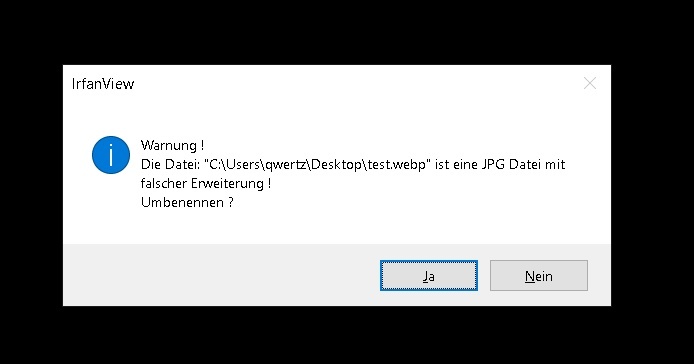
Image

This problem does not occur under version 3.16.2.

In addition, the file extensions are re-appended to uploaded images, whether jpg or webp. This means that bild.webp becomes bild.webp.webp. after the upload, apart from that the problem mentioned above arises.

In the admin area, no plugins are displayed in the overview after login (Simple Stats Plus, for example), it cannot be due to the PHP version at this point, which is the latest (8.4).

Furthermore, folders created by the CMS are not removed after an article is deleted and remain on the server.
User avatar
Edi
Site Admin
Posts: 3108
Joined: Sun Aug 09, 2015 5:01 pm
Location: Zurich
Has thanked: 74 times
Been thanked: 114 times
Contact:

There is already version v3.17.2.
clickwork.ch, digitale Projekte
Bludit-Tipps
lastpictures
Ssr. Bludit
Posts: 24
Joined: Mon May 01, 2023 9:18 am
Has thanked: 2 times
Been thanked: 3 times

All the errors are still present.
User avatar
indocreativemedia
Ssr. Bludit
Posts: 12
Joined: Sun Sep 24, 2023 5:09 am
Location: Indonesia
Been thanked: 2 times
Contact:

Hi,

Tested v3.17.2 and everything looks fine.

Screenshot_2026-02-13_04-26-20.jpg
Screenshot_2026-02-13_04-26-20.jpg (23.4 KiB) Viewed 156 times

No problem in deleting too.

Do you have PHP gd module enabled? (Just a hunch).
lastpictures
Ssr. Bludit
Posts: 24
Joined: Mon May 01, 2023 9:18 am
Has thanked: 2 times
Been thanked: 3 times

Hello,

Are you using the TinyMCE editor? I have no problem uploading or deleting images when creating new content. The problem only occurs when I completely delete content I've already created. Then the corresponding folder under

Code: Select all

bl-content/uploads/pages
on the server isn't deleted.

What's also noticeable, as I described in my opening post regarding uploaded photos, is that you're experiencing the same issue, as you can see in the screenshot.

Yes, it's enabled. But there wasn't a problem before with version 3.16.2 and earlier versions.
User avatar
indocreativemedia
Ssr. Bludit
Posts: 12
Joined: Sun Sep 24, 2023 5:09 am
Location: Indonesia
Been thanked: 2 times
Contact:

Hi,

Yes i'm using TinyMCE.

I have no problem in deleting content pages.

Both folders containing the text file and the uploaded image file are deleted, including the thumbnail folder, so 3 folders in total are deleted successfully.

About the image file name, actually it's a feature, not a bug.

If you upload an image with non-web-safe file-name (containing non-alphanumeric characters other than -, using uppercase file extension), then it will be renamed into a web-safe file-name.

About the problem happened in your server, i think we need to check the error_log.

If you're using cPanel or DirectAdmin, there's a menu to check error_log easily.
lastpictures
Ssr. Bludit
Posts: 24
Joined: Mon May 01, 2023 9:18 am
Has thanked: 2 times
Been thanked: 3 times

About the image file name, actually it's a feature, not a bug.

If you upload an image with non-web-safe file-name (containing non-alphanumeric characters other than -, using uppercase file extension), then it will be renamed into a web-safe file-name.
Thanks for the reply. I misinterpreted the function.
I have no problem in deleting content pages.

Both folders containing the text file and the uploaded image file are deleted, including the thumbnail folder, so 3 folders in total are deleted successfully.
I reinstalled Bludit cleanly, and now it works as you described! There were probably some leftover files that were blocking something.
Post Reply